

Hello guys how are you? Welcome back to my blog. Today in this blog post, I am going to 👉 “Fix: ‘This journal is currently not accepting user registrations’ in OJS (Step-by-Step)”.
Guys, While working on Open Journal Systems (OJS), you may see this error:
This journal is currently not accepting user registrations.
This usually appears when trying to open the registration page or submit the registration form.
Why This Happens?
This error occurs due to one of the following reasons:
- No journal has been created yet
- User registration is disabled in settings
- You are inside site admin, not a specific journal
Solution (Step-by-Step)
🔹 Step 1: Create a Journal
Go to:
Dashboard → Hosted Journals → Create Journal
Fill in:
- Journal Name
- Path
- Contact details
👉 Click Save
Step 2: Open Journal Dashboard
After creating the journal:
- Click on the journal name
- Enter the journal dashboard
tep 3: Enable User Registration
Go to:
Users & Roles → Settings
👉 Enable:
✔ Allow users to register with the journal.
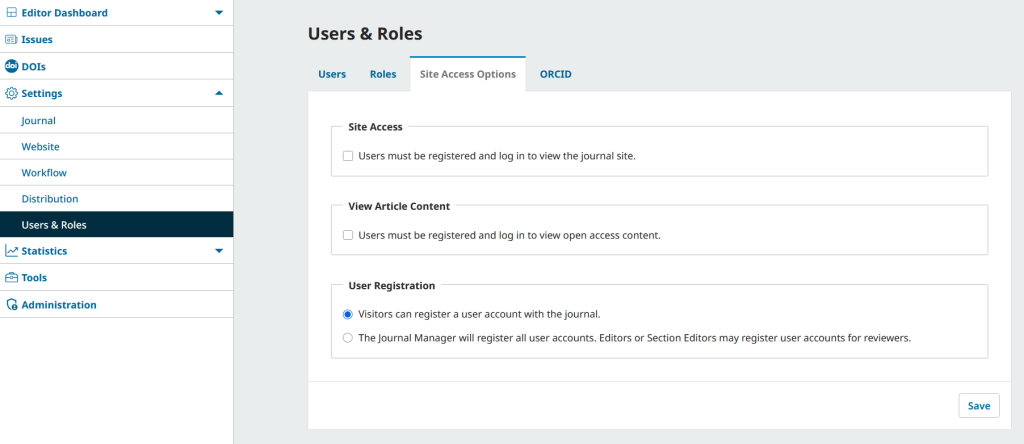
Step 4: Save Changes
Click Save
Result
Now:
- Registration page will work
- Error message will disappear
- Users can create accounts successfully
Important Tip
If you’re working in OJS for the first time:
👉 Always create a journal first
👉 Most features (including registration) depend on journal context
Conclusion
This is a common beginner issue in OJS. Once the journal is created and registration is enabled, everything works smoothly.
Guys if you will have any kind if query then feel free to contact me.
Ajay
Thank